
Most product teams do not struggle for ideas. They struggle to know which ideas connect to anything that matters. A backlog that grows longer than the team can process is not a capacity problem. It is a clarity problem. Impact mapping is a planning technique that addresses this before a single user story gets written.
Gojko Adzic developed impact mapping and published it in his 2012 book. The technique organises thinking into four levels.
The centre holds the business goal. Surrounding the goal are the actors whose behaviour affects it. Around each actor sit the specific behaviour changes required. The outermost level holds the features that could produce those changes. Every item traces back through reasoning the whole team produced together.
The goal and the actors
An impact mapping diagram is radial, with the business goal at the centre and four distinct levels radiating outward.
The first level is the goal (why). This is a measurable business outcome with a direction, a metric, and a timeframe. ‘Increase the percentage of active projects with at least one status update per week from 18% to 40% by end of Q3’ is a goal. ‘Improve engagement’ is not. If the goal cannot tell you whether you succeeded three months from now, it needs rewriting before the session goes any further.
The second level is actors (who). These are the people whose behaviour affects the goal, directly or indirectly. This includes primary users, secondary users, internal teams and sometimes external partners. Actors should be specific.
‘The project manager who decides whether to renew the contract’ is more useful than ‘enterprise customers’. The more concrete the actor, the more honest the impact discussion that follows.
Impacts and deliverables
The third level is impacts (how). These are the specific behaviour changes you need from each actor to achieve the goal. Impacts are not features. They describe what an actor would do differently if the product served them well.
‘Field supervisors log progress from site rather than waiting until they return to the office’ is an impact. ‘Field supervisors use the mobile app’ is not. That describes product usage, not a behaviour change that connects to the goal.
The fourth level is deliverables (what). These are the features, changes, or experiments that could produce the required impacts. Deliverables only appear after the team has agreed on the impacts they are targeting.
That sequencing matters. By the time you reach this level, every proposed item has a traceable reason to exist. The team crosses out anything that does not connect to an agreed impact rather than carrying it forward quietly.
What impact mapping is not
Teams often confuse impact mapping with related techniques. It is not a user story map, which charts the user’s path through a product and organises stories by activity. It is not an opportunity solution tree either.
The OST is a discovery tool for mapping user research to testable product ideas. It can sit downstream of the impact map, taking its starting outcome from the goal the impact map defines. A fuller treatment is in Opportunity Solution Trees in Practice.
Impact mapping is not a roadmap. It has no timelines, resource assignments, or release dates. Its job is to make the logical connection between a business goal and a set of proposed deliverables visible and open to challenge. Once you have established that connection, other tools handle sequencing, discovery, and delivery.
Writing features as impacts
The most common impact mapping mistake is writing features in the impacts level. When a team lists ‘users receive a weekly digest email’ as an impact, they have skipped the behaviour change and gone straight to a solution. The actual impact might be ‘users check project status at least twice a week without a prompt’. The digest email might achieve that or it might not. Keeping impacts as behaviour descriptions preserves the option to find a better deliverable.
Vague goals, too many actors, and solo sessions
The second mistake is a goal that nobody has agreed on. A facilitator writes ‘increase user retention’ at the centre of the map, everyone nods, and the session continues. An hour later, disputes surface because ‘retention’ means different things to different people. Measuring retention by login frequency produces different deliverables from those produced by measuring it by projects completed. Twenty minutes spent challenging the goal at the start is time well spent.
The third mistake is listing too many actors. A map with eight actor columns is hard to rank. Aim for four at most. If you have more, ask which actors’ behaviour changes would have the greatest effect on the goal and work with those. Lower-priority actors can be mapped in a separate follow-up session.
Impact mapping sessions work best when the whole team is involved. An impact map built by one person is a hypothesis. The rest of the team was not part of forming it. It does not surface disagreements or reveal the assumptions different people hold about user behaviour. The value of the session is in the room, not in the output.
Group size and preparation
A working impact mapping session runs for 90 minutes. Any longer and the quality of the deliverables level starts to decline. Anything shorter tends to compress the goal-setting work, which is where the clearest results come from.
The ideal group is five to six people. This means the product manager, one or two engineers, and a business stakeholder who owns the goal metric. Add a designer or researcher if the product has complex UX. Beyond six, the session becomes harder to facilitate and quieter voices get crowded out.
Use a physical whiteboard or a shared digital canvas. The radial layout matters. It makes the four levels visually distinct and encourages people to draw links between branches rather than treating each column in isolation.
Running the session
Start by writing the proposed goal at the centre and challenging it openly. Is it measurable? Does the team know the current baseline? Does everyone in the room agree this is the right goal for this quarter?
In practice, this challenge typically takes 15 to 20 minutes. It surfaces assumptions that would otherwise emerge as conflict when ranking deliverables.
Next, move to actors. Who can help achieve this goal? Who can hinder it? The obvious names come out first. Push past them.
The actor who matters most is often the one nobody thought to put on the list, because their influence shows up in data gaps rather than in meetings.
These might be internal teams whose processes feed the product, or external parties who currently work around it. List them by name or role and make them specific.
Impacts, deliverables, and session close
For each actor, map the impacts. What would they do differently if the product served this goal perfectly? Push back on anything that sounds like a feature in disguise. ‘They would use the dashboard more’ is not a behaviour change; it is a hope.
Ask what they would do with the dashboard that they cannot do now, and what decision or action would follow. Keep asking until you reach something an outside observer could see happening.
Once you have mapped the impacts, turn to deliverables. For each impact, ask what the team could build or change to produce that behaviour shift. Capture everything without filtering. Filtering comes next.
Then mark which impacts connect most directly to the goal. Cross out deliverables that serve low-priority branches. Flag anything uncertain enough to warrant a discovery spike before committing build time.
Close by photographing or exporting the map and asking someone to digitise and share it within 24 hours. A map that stays on the whiteboard gets forgotten.
These impact mapping examples come from different industries. The first covers a B2B SaaS activation problem that most digital product managers will recognise. The second steps into field service, which lets you stress-test what you learned from the first example against a different set of actors and pressures.
Clearflow, a B2B SaaS product
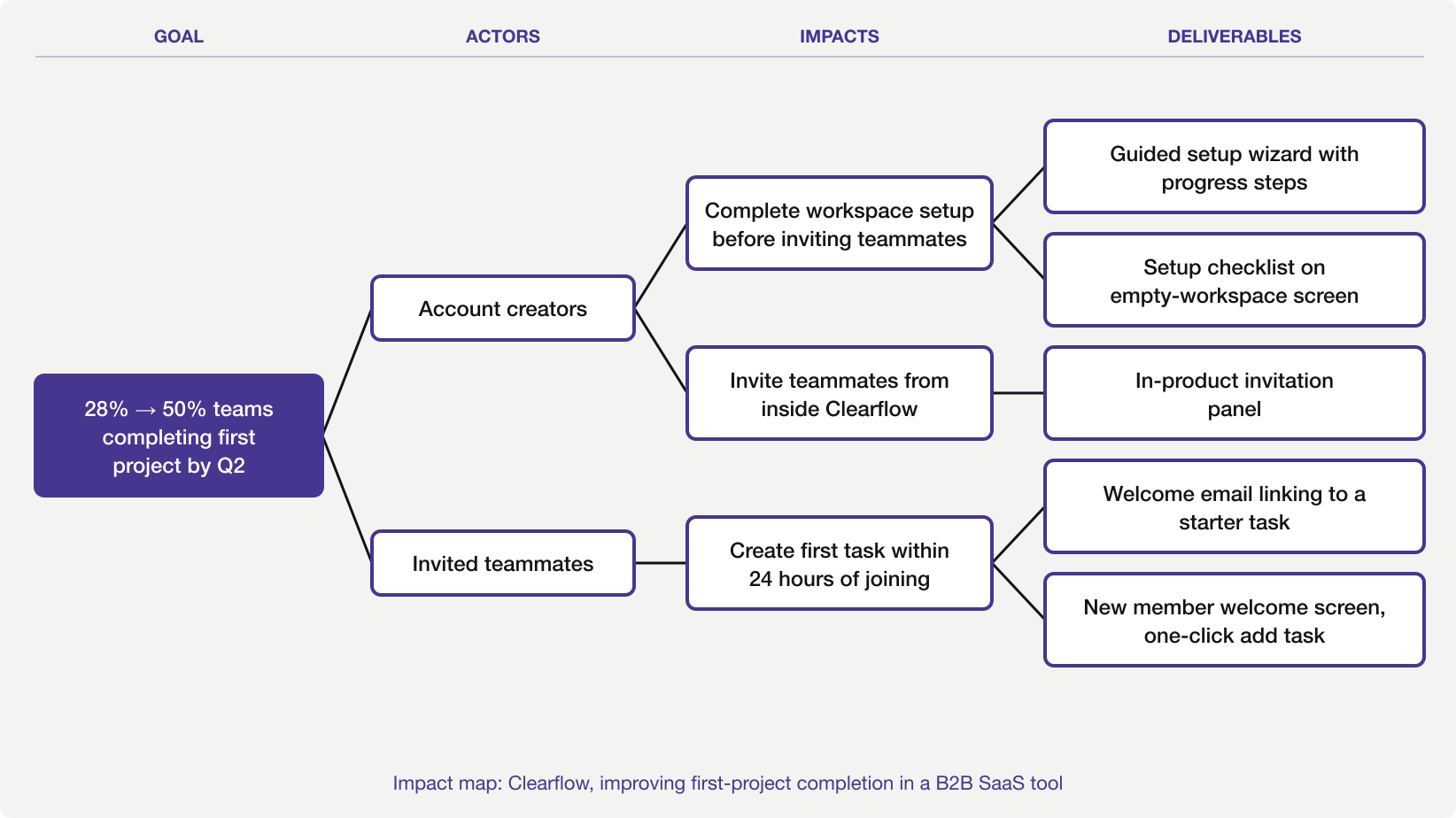
Most digital product managers have run into an activation problem. You build something people sign up for, but the share who complete anything useful in the first cycle stays low. The Clearflow team is tackling this with impact mapping. Their goal is to raise the share of teams finishing their first project from 28% to 50% by end of Q2.
Two actors shape the map. Account creators sign up and configure the workspace. If they leave before their team is onboarded, nobody else picks up the work. Invited teammates join later, often cold, with little context about what is expected of them.
For account creators, two impacts matter. They should complete workspace setup before inviting anyone, rather than sending colleagues into an empty shell. They should also issue invitations from inside the product rather than by external link, which strips out the onboarding context. The deliverables on this branch are a guided setup wizard with progress steps, a setup checklist on the empty-workspace screen, and an in-product invitation panel.
For invited teammates, the critical impact is creating a first task within 24 hours of joining. If they log in, find nothing familiar, and leave, winning them back is hard. The deliverables are a welcome email linking directly to a starter task and a new member welcome screen with a single, prominent add-task button.
Fieldtrack, a field service tool
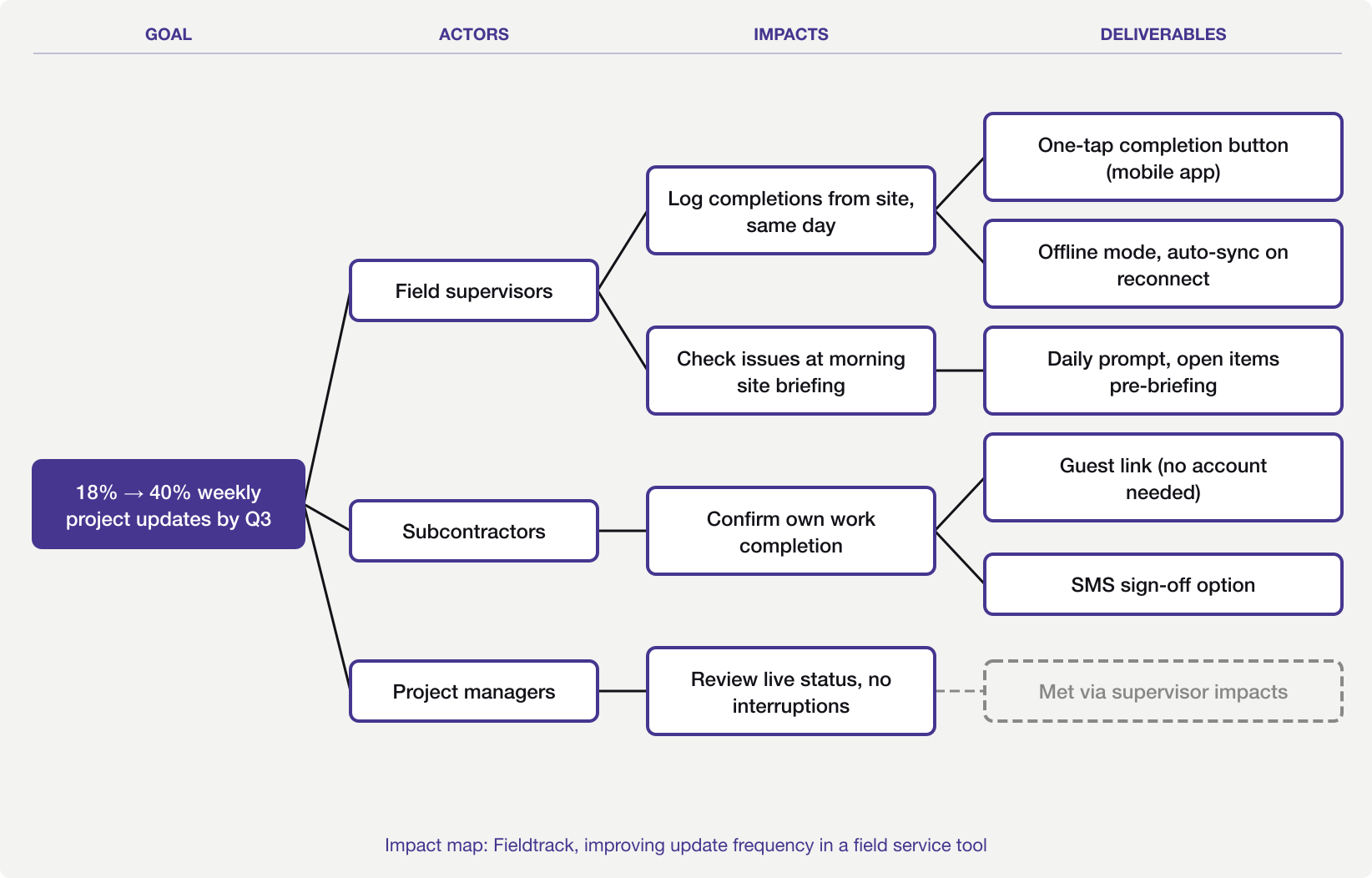
Fieldtrack is a project management tool for field service businesses. The goal is to raise the share of active projects with at least one weekly status update from 18% to 40% by end of Q3. Regular updates cut disputed invoice rates by 60%, a key driver of renewals.
Three actors emerge from the impact mapping session. Field supervisors own the project on the ground. Subcontractors complete tasks but confirm completions by email to the project manager. Project managers review status but rarely enter it themselves.
The main impacts land on supervisors and subcontractors. Supervisors need to log completions from site on the same day rather than end-of-week batching. They should also check open issues at the morning briefing rather than relying on calls to the office.
The subcontractor impact is simpler. They should confirm their own completions rather than emailing someone else to record it. That round-trip adds 24 to 48 hours of lag and is the biggest source of data gaps.
Supervisor deliverables include a one-tap completion button for mobile, offline mode with auto-sync, and a daily prompt before the morning briefing. The subcontractor branch yields a guest link with no account required and an SMS sign-off for contractors without smartphones. Project managers are downstream; the team defers that branch once supervisor and subcontractor data is current.
Translating the map to your backlog
An impact mapping exercise does not produce the backlog. It creates the structure that makes the backlog clear. Each deliverable on the map traces back to an impact and an actor. That chain is the context every user story needs but rarely has.
When writing user stories from the map, use the impact as the ‘so that’ clause. Without map context, a story reads ‘As a user, I want an offline mode.’ With the actor and impact documented, it becomes ‘As a field supervisor on a low-signal site, I want to mark a task complete on my phone so that my project manager sees the update today.’ That second form is far better. Both the actor and the reason are already on the map, so it is easy to write.
The map also helps at sprint review. When a stakeholder asks why the team prioritised a feature, the answer is on the map. It served a specific actor impact that connects to the agreed goal. That chain is worth more than a priority score. It grounds the choice in the room’s shared reasoning, not a formula applied after the fact.
For teams working to connect product metrics to delivery decisions, the impact map is a practical starting point. It requires the goal to be stated in measurable terms. Without that, there is no way to judge whether the chosen deliverables worked.
Keeping the impact map alive
A map produced in a session and then archived has served a fraction of its purpose. Revisit it at the midpoint of the quarter. Ask which impacts have been produced and which have not. Use that to decide whether the remaining deliverables are still the right ones.
A map that looks the same three months after the session was either perfect on the first attempt (unlikely) or was set aside and forgotten.
After the map
An impact map that gets filed after the session and referenced only when someone asks why a feature was built has done part of its job. The harder part is checking whether the impacts you planned for are actually happening, and adjusting them when they are not.
Each item on the Fieldtrack map rests on at least one belief about how someone will behave. For supervisors, the one-tap button assumes they will switch from batch logging to same-day entry once the friction drops. For subcontractors, the guest link assumes they will confirm completions themselves rather than calling the project manager. Those beliefs need testing before the team commits build time to them.
Teresa Torres’s continuous discovery work and the SVPG product discovery writing address this territory from different angles. The opportunity solution tree, covered in Opportunity Solution Trees in Practice, sits most naturally downstream, taking the goal the impact map defined as its own starting point.